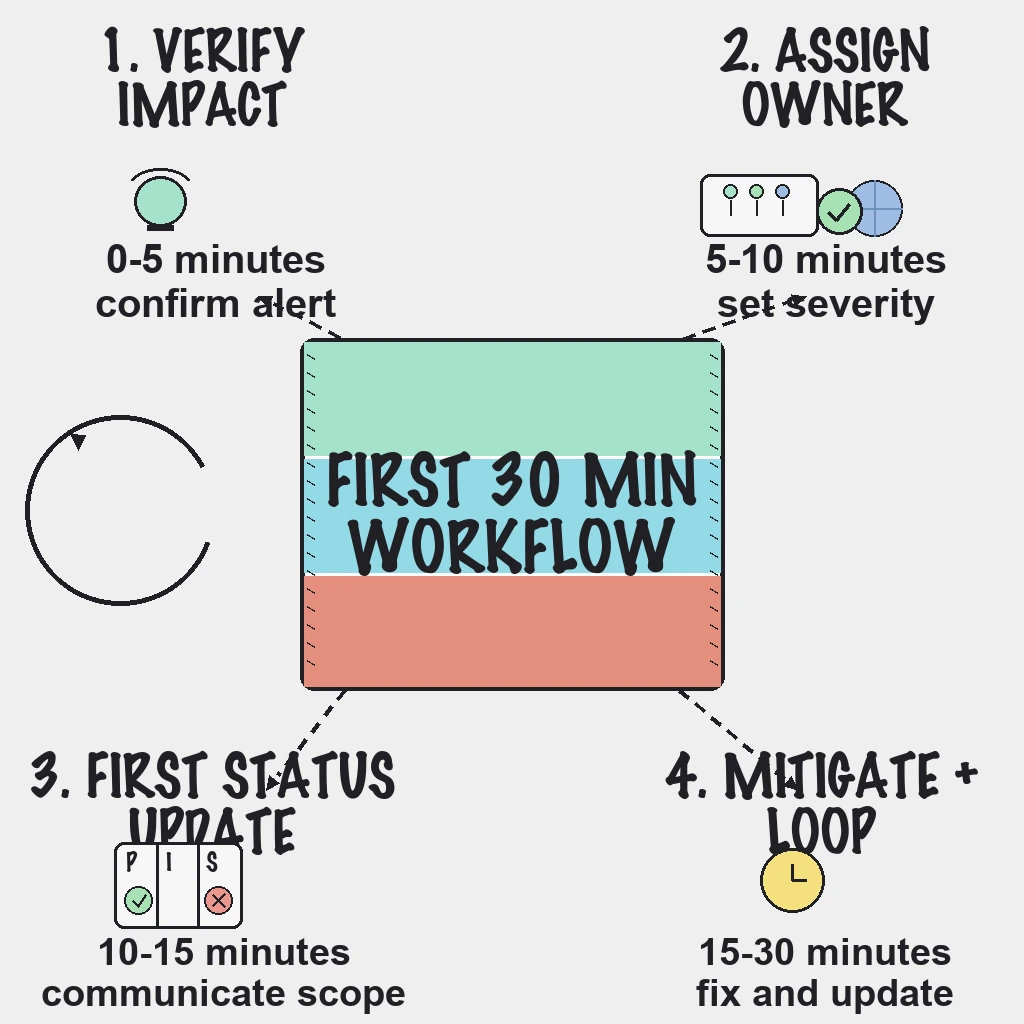
When production breaks, the decisions made in the first 30 minutes shape the whole incident: how long it lasts, how many people get pulled in, and how customers feel about it afterwards. Then the pressure drops, the service recovers, and many teams quietly lose momentum. That second gap is where repeat incidents are born. This guide covers both halves: a minute-by-minute workflow for the first 30 minutes, and a follow-through process that carries the incident from stabilization to genuine closure.
Direct Answer
- Minutes 0 to 5: validate the alert with at least two signals.
- Minutes 5 to 10: assign one incident lead and set severity by customer impact.
- Minutes 10 to 15: publish the first status update with scope and a next-update time.
- Minutes 15 to 30: run a mitigation loop with timed communication updates.
- After stabilization: within 24 hours, move every follow-up action into a tracker with an owner and due date, and do not close the incident until that is done.
Why This Matters
Early decisions compound. A team that spends ten minutes arguing about whether an alert is real, or that has three people independently restarting services, turns a short incident into a long one. A repeatable first-30-minute workflow reduces that chaos, speeds recovery and keeps communication calm.
Detection speed alone does not prevent recurrence, though. Runbook updates, alert tuning, root-cause fixes and communication improvements are what stop the same incident returning next month. When they live only in a chat thread, they get lost, on-call stress rises and reliability slowly regresses.
Before the Pager Goes Off
- Name the incident owner for every shift, with a backup.
- Route alerts by severity and service criticality, so a P1 on checkout pages someone and a warning on a marketing page does not.
- Keep status page components and subscriber lists ready before you need them.
- Keep short runbooks for your highest-risk services: how to confirm, first actions, who to escalate to and how to verify the fix.
- Review SSL certificate expiry warnings weekly so a renewal never becomes an incident.
Field note: Disciplined execution beats brilliance at 3am. The first 30 minutes go well when the runbook, the owner and the evidence were ready before the alert fired, not when someone heroic happens to be awake.
Severity and Confidence: Prevent Over-Paging
Classify by impact:
| Severity | Definition |
|---|---|
| SEV1 | Broad customer impact or a revenue-critical outage |
| SEV2 | Partial degradation with active customer impact |
| SEV3 | Limited or internal impact |
Then add confidence before paging:
- High: failures confirmed from multiple regions plus elevated errors.
- Medium: a single region failing, or symptoms in one dependency.
- Low: a single-probe anomaly only.
Page after hours only when confidence and customer impact are both high. Everything else waits for a channel or the morning. Monitoring that confirms failures across regions before alerting does much of this work for you: PingAlert uses quorum-based confirmation across monitoring regions, dedupes notifications, and applies escalation policies and quiet hours, so the page that wakes someone is already high confidence. See how that works for website monitoring.
The First 30 Minutes, Step by Step
Minutes 0 to 5: validate
- Confirm the alert with at least two signals: a second region, error rates, a failed transaction check or customer reports.
- Confirm real customer impact before broad escalation.
Minutes 5 to 10: own it
- Assign one incident lead. One person decides; everyone else executes or advises.
- Set severity using the table above, and open a single incident channel.
Minutes 10 to 15: tell customers
- Publish the first external update within 10 to 15 minutes, covering the affected service, visible impact, when it started and the next update time.
- Include a next-update time in every message after this one too.
Minutes 15 to 30: mitigate in loops
- Prefer the fastest safe mitigation (rollback, failover, disabling a feature) over a root-cause fix.
- Log every decision and rollback point in the one channel, with timestamps.
- Post timed updates every 15 to 30 minutes, even when nothing has changed.
For wording and cadence beyond the first update, follow the status page workflow for the first 60 minutes.
Short-form customer update template
- Investigating: investigating impact on [service], next update in 30 minutes.
- Identified: issue identified in [component], mitigation in progress.
- Monitoring: fix deployed, stability under observation.
- Resolved: service stable, follow-up prevention actions scheduled.
Follow-Through: From Stabilization to Closure
Stabilize before you resolve
Move to Monitoring once the fix is deployed, and hold it there until checks and error rates stay healthy through a defined observation window. Then post Resolved with the prevention steps you plan to take.
The 24-hour checklist
- Capture the timeline: detection, acknowledgement, mitigation and resolution times.
- Publish a customer-facing summary with impact and outcome.
- Convert every follow-up action from chat into a tracker task.
- Require an owner, a due date and a priority on each task.
- Schedule a completion review for seven days later.
An incident timeline kept as the incident unfolds, such as a PingAlert incident timeline, makes the first item a copy job instead of an archaeology project.
The closure gate
Make one rule non-negotiable: an incident is not closed until its follow-up tasks exist in the tracker with owners and due dates. Complete the root-cause analysis within a fixed window, keep the review blameless, and focus on what the system allowed to happen rather than who pressed which button.
Field note: The incident ends when the service recovers; the problem ends when the follow-up ships. Teams that confuse the two get very good at responding to the same outage.
The weekly reliability review
- Review open follow-up tasks and chase anything overdue.
- Confirm each incident produced at least one prevention improvement.
- Tune the noisiest checks to reduce alert fatigue.
- Audit status updates for clarity and cadence.
- Share a short reliability recap with engineering and support.
Reader Questions, Answered
What should be in the first status page update?
The affected service, the visible customer impact, when the incident started and the time of the next update. Root cause can wait.
How often should updates be posted during an incident?
Every 15 to 30 minutes during active high-impact incidents. Longer, lower-impact incidents can move to a stated 30 to 60 minute cadence.
Should every alert page someone after hours?
No. Page after hours only when confidence and customer impact are both high, such as failures confirmed from multiple regions on a customer-facing service.
What is the fastest way to improve incident management quality?
Adopt a closure gate: an incident cannot be closed until its follow-up tasks are in a tracker with an owner and a due date.
How do we know follow-through is working?
Track the share of follow-up tasks completed within seven days. It is a useful leading indicator: when it slips, repeat incidents tend to follow.
Wrap Up
The first 30 minutes should be procedural, not improvised, and the week after should be just as deliberate. Validate, own, communicate and mitigate, then refuse to call it closed until the fixes have names and dates on them. That is how incident response stops being a recurring cost and starts compounding into reliability. Use the free uptime monitoring requirements checklist to check your detection and alerting setup, or compare plans.
Related guides:
- Status page incident communication workflow: the first 60 minutes
- Uptime monitoring for small teams without alert fatigue
- Agency incident response playbook
- MSP uptime monitoring playbook