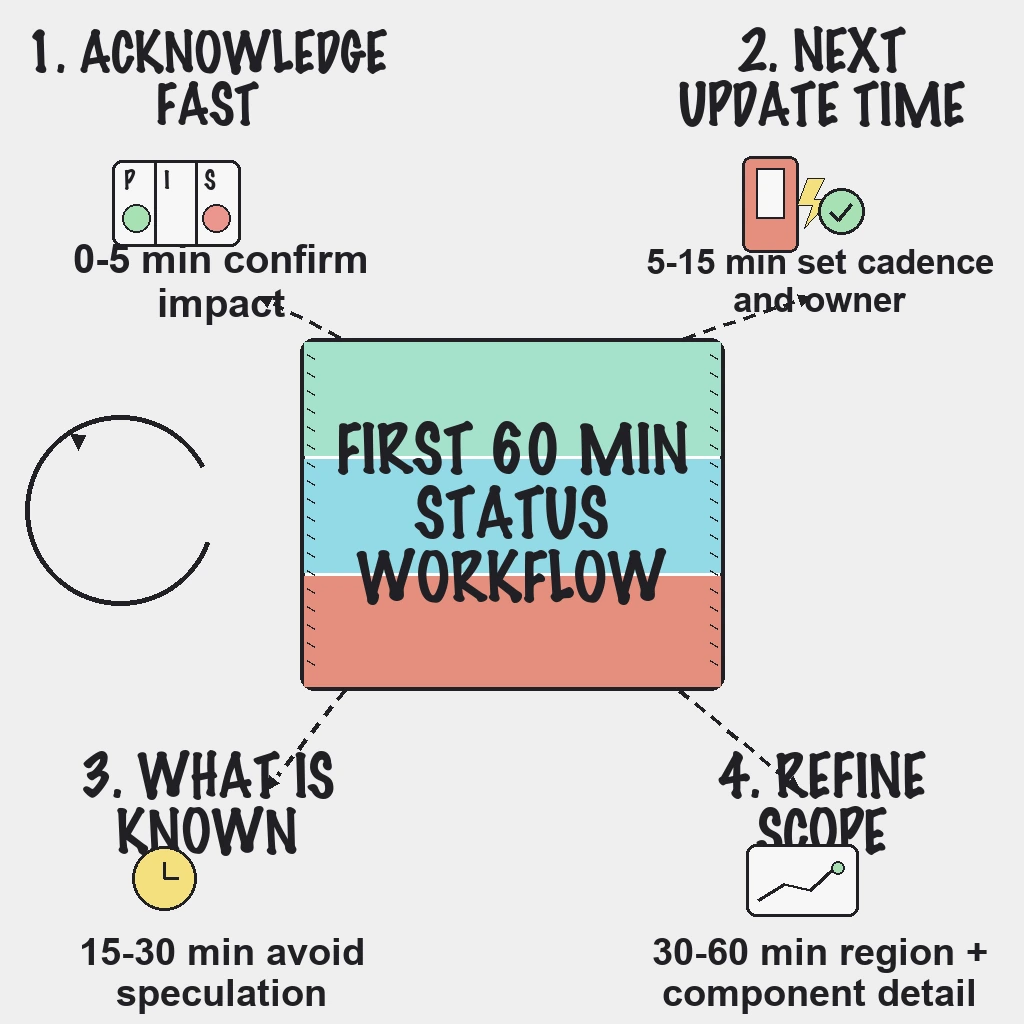
During an incident, customers do not need a perfect root cause in minute one. They need confirmation that you know, a clear statement of what is affected, the time of your next update, and proof that you will keep that promise. Communication done well calms customers and shrinks the support queue; done badly, it amplifies the outage. This guide uses the first 60 minutes as its backbone, then covers the roles, templates, cadence and closing steps that make the workflow repeatable.
Direct Answer
- Confirm customer impact, then post an Investigating update within about 10 minutes.
- Assign one incident lead for the fix and one communications owner for the wording, so talking never slows fixing.
- Put an exact next-update time in every message and keep a fixed cadence, even when nothing has changed.
- Mark the incident resolved only after a defined stability window, then publish a summary within 24 hours.
Why This Matters
Status communication usually breaks in one of two ways. The team waits for technical certainty before saying anything, so customers learn about the outage from each other. Or the team posts once and then goes quiet, so customers assume nobody is working on it. Both send people to support, social media and account managers, which pulls responders away from the fix.
A lightweight workflow with defined ownership prevents both. It also protects the people fixing the problem: when the comms owner handles every external message, the engineers can stay heads down.
Field note: The silence between updates is where trust leaks. Customers forgive an outage faster than they forgive not knowing whether anyone is working on it, so a dull "still investigating, next update at 14:30" beats a gap every time.
Before the Incident: Set Up the Workflow
Most of the work happens before anything breaks:
- Define roles. Incident lead (owns the fix and decisions), communications owner (owns every public word), and technical owners for each affected service.
- Set a first-update target. A hard target, for example 10 minutes from confirmed impact, removes the temptation to wait.
- Decide what goes public. Not every alert deserves a post. Publish when customer impact is real or likely; keep single-probe blips and internal issues internal.
- Match component names. Name status page components the same way your monitors and runbooks do, so nobody translates under pressure.
- Prewrite templates for Investigating, Identified, Monitoring and Resolved.
- Keep subscriber lists current so updates reach the people who need them.
The First 60 Minutes
0 to 5 minutes: confirm and acknowledge
- Confirm customer impact from uptime checks, ideally failures confirmed across more than one region.
- Set severity and mark the affected components.
- Assign the incident lead and the communications owner by name.
- If impact is clear, acknowledge it publicly right away in plain language.
5 to 15 minutes: the first full update
Make sure the first update has gone out by the 10-minute mark and that it includes:
- What users are seeing, in their words, not yours.
- Which components or regions are affected.
- What the team is doing now.
- Workaround guidance, if any exists.
- The exact time of the next update.
15 to 30 minutes: known and unknown
- Post what is known and what is still unknown. Stating uncertainty is fine; guessing is not.
- Avoid speculative root-cause claims. An early guess that turns out wrong costs more trust than saying "we are still investigating".
- Hold the cadence even without major change.
30 to 60 minutes: refine and reconfirm
- Narrow the impact by region, feature or customer segment as the picture sharpens.
- Share workaround status and any remaining risk.
- Reconfirm the next update time.
- If the incident will clearly run past the hour, brief support, account managers and anyone posting on social channels so they repeat the status page rather than improvise.
Update Cadence
For high-impact incidents, update every 15 to 30 minutes. Early on, lean toward 15; once a fix is in progress and the scope is stable, 30 is reasonable. For long-running, lower-impact incidents, a 30 to 60 minute cadence is acceptable as long as you state it and keep to it. The rule that matters is simple: never miss a promised update time. If there is nothing new, say so and set the next time.
Copy-Ready Update Templates
- Investigating: We are investigating elevated errors affecting [service]. Some users may be unable to [action]. Next update by [time].
- Identified: We have identified an issue in [component] and are applying a fix. [Workaround, if any.] Next update by [time].
- Monitoring: A fix has been deployed and we are monitoring recovery. Next update by [time].
- Resolved: [Service] has been stable since [time]. We will publish a summary with prevention actions within 24 hours.
Every update should include customer impact and a next step. Keep technical notes in the internal channel and incident timeline; external updates stay short and customer-focused.
Closing the Incident and the Post-Incident Summary
Resolve on evidence
Mark an incident resolved only after service metrics and uptime checks have stayed healthy through a predefined observation window. Resolving too early and reopening is worse than waiting a little longer.
Publish the summary within 24 hours
- Timeline from detection to resolution.
- Customer impact: who was affected and for how long.
- Root-cause category, in plain language.
- Corrective actions, with owners and due dates tracked internally.
Review the communication itself
- Did the first update meet the target?
- Was every promised update time kept?
- Were components named consistently with the monitors?
- Which monitors would have detected this sooner, and which runbooks or escalation rules need changes?
Review communication timelines monthly alongside your technical follow-ups. The incident management workflow for the first 30 minutes covers the technical side and the follow-through to closure.
Field note: Escalations and reviews go well when the evidence is ready before anyone asks for it. A comms owner who logs every public update with a timestamp hands the postmortem a clean timeline for free.
Your tooling should make this workflow the easy path. PingAlert white-label status pages support custom domains on paid plans, subscriber notifications, incident templates, incident timelines and a public incident history, so the same record serves customers during the incident and the team afterwards. For broader patterns, read status page best practices for customer trust.
Reader Questions, Answered
How soon should the first status update be posted?
A practical target is within 10 minutes of confirmed customer impact. A short Investigating message with a next-update time is better than waiting for a diagnosis.
How often should we post updates during an active incident?
Every 15 to 30 minutes for high-impact incidents, even if the investigation has not moved. Lower-impact, long-running incidents can use a stated 30 to 60 minute cadence.
What if the root cause is still unknown?
Say so directly, share the confirmed impact and what the team is doing, and commit to the next update time. Do not speculate.
Should every alert be posted publicly?
No. Post publicly when customer impact is real or likely. Even a small team or early-stage startup benefits from a simple public status page for those moments, because it reduces support noise and shows transparency.
When should we mark an incident resolved?
After service metrics and checks stay stable through a predefined observation window, not at the moment the fix is deployed. Use the Monitoring state to cover that window.
Wrap Up
Incident communication is a workflow, not a writing exercise. Decide the roles, templates and cadence on a quiet afternoon, and the first 60 minutes of a bad day mostly run themselves: confirm, publish, keep your promises, close on evidence. Check what your status page needs with the free uptime monitoring requirements checklist, or compare plans to set up a branded status page.
Related guides:
- Status page best practices for customer trust
- Incident management workflow: the first 30 minutes
- White-label status pages for agencies
- Agency incident response playbook